Keeping a business running smoothly is a lot of work. Cornerstone makes that work a little easier with convenient financial services and round-the-clock access.
Phone Access 24/7
sticky header-offset
Even when WiFi fails you, we’re still in your corner. Just call to check balances, transfer funds between accounts, your loan or your Visa®, and hear account histories. You can even change your access code.
To access your accounts, call (800) 777-6728.
Wire Transfers
sticky header-offset
Transfer funds quickly and safely between your Cornerstone account and an account at another financial institution (or vice versa) with this convenient service.
If your ATM/debit card or Visa® Platinum Card is lost or stolen, please contact us immediately at (800) 777-6728.
Also, don't forget to turn your card off in online or mobile banking to prevent any unauthorized purchases.
Direct Deposit Info
Automatically receive payroll, tax refunds, pensions, Social Security or other government funds, and bonuses deposited directly to your account. Direct deposit is convenient and allows instant access to your funds as soon as they are deposited.
Moving your direct deposit to Cornerstone
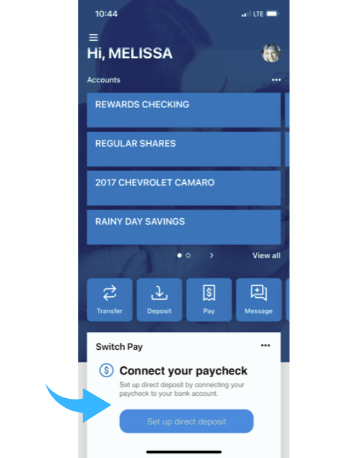
Switch Pay is a completely digital way to move your direct deposit to any Cornerstone account right through the mobile app or online banking. No paperwork, no calling your company’s payroll department - Switch Pay is easy, secure, and verified in real time.
Here's how to use Switch Pay:
Log in to Cornerstone's mobile app or online banking
Click on the Switch Pay icon on the main dashboard
Select the Cornerstone account into which you'd like your direct deposit to go.
Search for your payroll provider or employer and follow the prompts
Please Note: You will need your login credentials for your payroll provider in order to complete this process. If you do not know your credentials, reach out to your employer's HR department.
If you have to go the "old school" route with setting up your direct deposit, provide the two pieces of information below to your employer or the entity responsible for your payments:
Cornerstone Community Financial Routing Number: 272477429
Your MICR Account number (found at the bottom of your check) or within online banking
For your convenience, you may also print this form and provide it to your employer.